
Picture a busy property maintenance contractor finishing the final appointment of the day. Several repairs have been completed, photographs have been taken and customers have been updated. The physical work is finished, but there are still reports to prepare for the property management company that arranged the jobs.
The contractor has the information somewhere. Some details are written in a notebook, photographs are stored on a phone and additional instructions were received through messages. Before the reports can be sent, everything needs to be gathered together and organised.

It is a familiar problem for many trade businesses, and one that becomes increasingly frustrating as the volume of work grows.
Digital job reports offer a more practical approach. Instead of relying on handwritten notes and manually assembled documents, businesses can record information electronically and use it to produce clear, professional records of completed work.
For plumbers, electricians, builders and maintenance contractors, the benefits go beyond simply replacing paper with a computer screen. A well organised digital reporting process can improve customer communication, reduce unnecessary administration and make important information easier to retrieve.
What Is a Digital Job Report?
A digital job report is an electronic record containing information about work carried out for a customer. It typically includes the customer details, job location, date, description of the work and any relevant photographs or supporting documents.
Depending on the type of job, it may also contain information about materials, equipment, inspections or recommendations for future work.
The report can be prepared electronically and presented in a format such as PDF, allowing customers to retain a professional record without needing access to the contractor’s own software.
Digital reports are used across many different trades. A plumber might prepare one after completing a repair, while an electrician may use a report to summarise maintenance work. Building contractors and property maintenance companies may need more detailed records covering several stages of a job.
The amount of information required varies, but the underlying purpose is the same. A digital job report provides a clear account of completed work that can be understood and retrieved when necessary.
Why Traditional Paper Reporting Can Become Inefficient
Paper forms have been used successfully by trade businesses for decades. They are familiar, straightforward and do not necessarily require specialist equipment.
However, paper reporting has limitations, particularly when photographs and supporting documents need to be included.
An engineer might complete a handwritten worksheet containing the job description, while photographs remain on a phone. Certificates or other documents may be stored separately. Somebody then has to gather the information and prepare a report for the customer.

This process can involve repeated data entry and unnecessary handling of the same information.
Handwritten records can also be difficult to interpret, especially when notes are completed quickly during a busy working day. Paper documents may be misplaced, damaged or stored in locations that make retrieval inconvenient.
Digital reporting does not automatically solve every administrative problem. A poorly designed system can create its own frustrations. However, a practical digital process can reduce the need to transfer information repeatedly between different documents.
The Growing Importance of Professional Customer Reports
Customers increasingly expect businesses to communicate clearly and provide information electronically. Invoices are routinely sent by email, appointments are arranged through digital systems and important documents are often stored electronically.
Job completion reporting is a natural part of this wider change.
A landlord arranging repairs at a rented property may want a clear record of what happened. A facilities manager responsible for several buildings may need documentation relating to maintenance visits. A homeowner may appreciate receiving information about repairs or installations for future reference.
A professional digital report can help meet these expectations by bringing relevant information together in a consistent format.
This is particularly useful when the person arranging the work is not present during the job. Rather than relying entirely on a brief telephone conversation, the customer can review the description of the work and any appropriate supporting photographs.
Good reporting can therefore become part of the overall service a contractor provides.
Better Organisation Starts With Better Job Records
One of the main advantages of digital job reporting is the ability to organise information around individual jobs.
Consider a contractor completing several maintenance visits each day. Every job generates details that may be needed later, including customer information, descriptions of work, photographs and supporting documents.
When this information is scattered across different devices and folders, preparing reports becomes more difficult.
A consistent digital process allows the relevant details to be associated with the correct job from the beginning. This makes it easier to review the work and prepare documentation afterwards.
It also improves the usefulness of the records over time. If a customer requests information about a previous repair, the business has a clearer starting point for locating the details.
Our complete guide to job documentation for trades explains why accurate records are important and what information businesses should consider retaining.
Digital Reports for Plumbing and Heating Businesses
Plumbing and heating contractors often complete a mixture of repairs, installations and maintenance work. Some jobs are relatively straightforward, while others involve more complicated equipment and technical requirements.
A digital job report can provide a useful summary of the work undertaken.
For example, a plumber attending a leaking connection might record the location of the problem, the repair completed and relevant details of any replacement components. Photographs can provide additional context where appropriate.
For heating engineers, job reports may include descriptions of maintenance activities, equipment information and supporting records.
However, general completion reports must not be confused with legally required gas safety documentation or other technical certificates. Where specific records are required, they must be completed in accordance with the relevant regulations by appropriately qualified individuals.
The role of a digital job report is to organise and present information about the work, not replace essential technical procedures.
For businesses completing numerous small jobs, a consistent reporting process can reduce the need to reconstruct information at the end of the day.
Digital Reports for Electrical Contractors
Electrical contractors frequently need to maintain accurate records of installations, repairs and maintenance activities.
A digital job report can help organise customer information, descriptions of completed work, relevant photographs and equipment details.
For example, an electrician carrying out maintenance at a commercial property may need to provide the facilities manager with a summary of the work undertaken. A clear report can explain which equipment was attended to, what work was completed and whether any further action was recommended.
Where electrical installation certificates, inspection reports or test records are required, these must be completed separately in accordance with the applicable requirements.
A general job completion report cannot replace proper certification.
Nevertheless, keeping supporting information organised can make customer communication and future record retrieval more straightforward.
Digital Reporting for Builders and Renovation Contractors
Building and renovation projects often involve work completed over several stages. Some parts of an installation may become inaccessible once later work has been carried out.
Photographs and written records can therefore be useful for documenting progress and completed stages.
For example, a builder refurbishing a property might record the original condition of an area, the repairs undertaken and the appearance of the finished work. Relevant photographs can help explain changes that may not be obvious from the final result alone.
Larger construction projects may have specific contractual documentation requirements, including technical records and formal handover information.
A general digital completion report should complement those requirements rather than replace them.
For smaller building businesses, however, a consistent reporting process can provide a more organised way to communicate with customers and retain information about completed work.
Why Property Maintenance Companies Benefit From Digital Reports
Property maintenance businesses often deal with a large number of individual jobs across different locations.
A typical week might include plumbing repairs, electrical maintenance, damaged fixtures, minor building work and general property repairs.
Each job may be relatively small, but the combined administrative workload can be substantial.
The company may need to provide completion details to landlords, property managers or commercial customers. Photographs, notes and supporting documents must be associated with the correct property.
When records are not organised properly, preparing these reports can become time consuming.
Digital reporting offers a consistent approach to collecting and presenting information. This can be particularly useful when several employees are completing work across different sites.
It also helps establish a clearer process for providing customers with documentation after each visit.
How Photographs Improve Digital Job Reports
Photographs are often one of the most valuable parts of a digital completion report because they help explain the work visually.
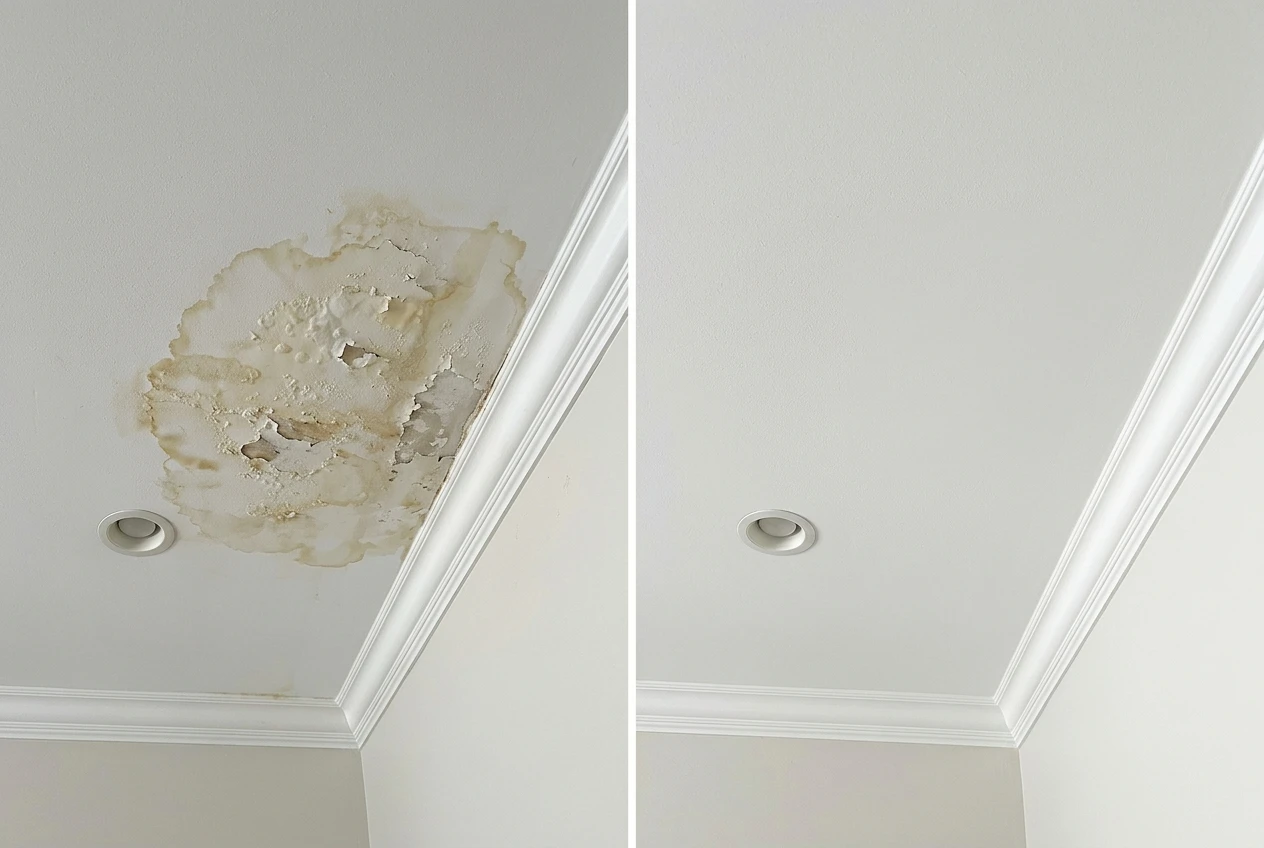
A contractor repairing water damage might include images of the affected area before work begins and the appearance of the repair afterwards. A roofing contractor could provide photographs of damaged components and the completed work.
These images can help customers understand what was undertaken, particularly when they were not present during the job.
However, photographs are most useful when they are accompanied by accurate descriptions and associated with the correct customer and property.
An image without context may be difficult to interpret later.
Businesses should also take care when photographing occupied properties or commercial premises. Images may contain personal or confidential information, and appropriate privacy considerations should be followed.
Our guide to job photos and records for tradespeople explains how to capture and organise useful photographic documentation.
Why PDF Reports Are Practical for Customers
PDF is a widely recognised document format that can be opened on most computers, tablets and compatible mobile devices.
This makes it a practical choice for sharing completion reports with customers.
A property manager can retain PDF reports alongside other maintenance records. A landlord may save them with documentation relating to a rental property. A homeowner can keep them for future reference.
The customer does not normally need access to the contractor’s job reporting software simply to read the document.
PDF also allows reports to be presented in a consistent layout, which can improve readability.
However, the format itself does not guarantee a professional report. The quality of the information remains the most important consideration.
A clear description of the work, accurate job details and relevant supporting records are more valuable than unnecessary decorative features.
Reducing Administration Through Digital Reporting
One of the most practical benefits of digital job reporting is the potential to reduce repetitive administrative work.
When information is recorded on paper, somebody may later need to transfer it into a separate document. Photographs may have to be downloaded, renamed and inserted into a report. Supporting documents may need to be located in different folders.
A digital documentation process can reduce some of these steps by keeping related information together.
This can make report preparation more consistent and reduce the amount of time spent searching for missing details.
The actual savings will depend on how the business currently operates and how effectively the system is used. A company with a well organised existing process may experience different benefits from one that relies entirely on handwritten notes and disconnected files.
Nevertheless, removing unnecessary duplication is a sensible objective for almost any business.
Our article on how to reduce paperwork in your trade business explores further practical improvements.
What Should You Look for in Digital Job Reporting Software?
Choosing software should begin with understanding the needs of the business rather than comparing lengthy lists of features.
A sole trader completing domestic repairs may simply need a reliable way to record job details, add photographs and prepare professional reports.
A growing trade company may place greater importance on consistency across several employees.
Useful capabilities include organising customer information, recording descriptions of work, adding relevant photographs, including notes and supporting documents, and generating clear completion reports.
Ease of use is particularly important. A system that requires excessive time or complicated procedures may create more administration rather than less.
Businesses should also consider how records are stored, who needs access and whether the software fits their existing working practices.
The most suitable system is the one that solves genuine problems without introducing unnecessary complexity.
Creating Professional Completion Packs
A digital job report can form the basis of a professional completion pack containing the relevant information about finished work.
The pack might include customer details, the job description, photographs, materials, equipment information and appropriate supporting documents.

For commercial customers, having this information presented consistently can be particularly useful.
A facilities manager may need reports for several maintenance activities, while a property management company may want documentation relating to individual buildings.
A clear completion pack provides a more organised record than a collection of unrelated files.
Our article on how to create a professional job completion pack explains what should be included and how to make the information useful to customers.
How ProofPackUK Supports Digital Job Reporting
ProofPackUK provides a practical way for UK tradespeople to organise job information and prepare professional completion reports.
The platform allows users to record customer details, descriptions of work, photographs, notes, materials, equipment information and supporting documents.
This information can then be brought together into professional PDF job completion packs.
For sole traders, this offers a more structured alternative to manually assembling reports from notebooks, photographs and separate files.
For growing trade businesses, it provides a consistent approach to documenting completed work.
Contractors working with landlords, property managers and commercial customers may also find it useful when preparing clear records of repairs, installations and maintenance activities.
The focus is on making professional documentation easier to manage without creating unnecessary administrative work.
Summary
Digital job reports offer trade businesses a practical way to improve how completed work is recorded and presented.
The benefits are not limited to replacing paper forms. A consistent digital process can make information easier to organise, improve customer communication and reduce time spent searching for records.
For sole traders, this may mean less paperwork after a busy working day. For growing businesses, it can help establish a more consistent reporting process across employees and customers.
The most important factor is not the technology itself, but how effectively it supports everyday work.
A good reporting system should be straightforward to use, produce accurate records and make professional documentation easier rather than more complicated.
If your business is ready to move away from scattered job notes and manually prepared reports, visit www.proofpackuk.com to discover how to create organised digital job records and professional PDF completion packs.
All the best!
Eamon